Audit Logs
Audit Logs provide a record of all significant actions performed within WLEDger. This transparency is useful for accountability, troubleshooting, and maintaining the integrity of your inventory, especially in multi-user or shared environments.
The Audit Log system ensures that every change, from a simple stock adjustment to a critical hardware configuration update, is tracked and attributable to a specific user.
Overview
Audit logs provide visibility into who did what and when. They provide a chronological trail of events that can be used to reconstruct the history of any part, bin, or system setting.
Regularly reviewing your audit logs can help identify patterns of usage, detect unauthorized changes early, and ensure that inventory management protocols are being followed.
Viewing Audit Logs
The Audit Logs can be accessed by Administrators via the Audit Logs page. The logs are presented in a searchable and filterable table.
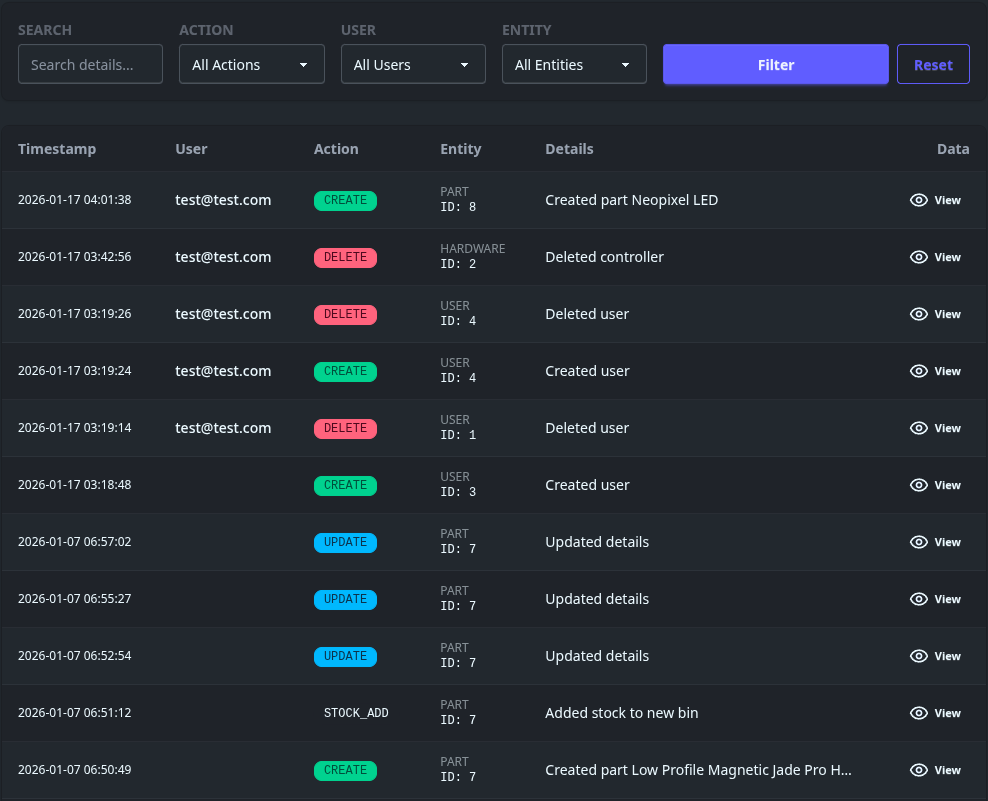
Log Field Descriptions
Each entry in the audit log contains the following information:
| Field | Purpose | Usage Tips |
|---|---|---|
| Timestamp | The exact date and time the action occurred. | |
| User | The email of the user who performed the action. | |
| Action | The type of operation performed (e.g., CREATE, UPDATE, DELETE). | Use this to filter for specific types of events, like all DELETE actions performed by email [email protected]. |
| Entity | The specific entity ID affected (ID: 1). | This is an identifier. Useful for troubleshooting. |
| Details | A short summary of action performed. | |
| Data | Click the eye icon to show the before and after state of the data. | Helps identify exactly what changed. |
Audit logs are stored indefinitely by default.